PCEngine Volfied - Secret Tricks  Stage Tips  Stage Items

Some Commands
[Option Mode]
At the title screen, hold Select + I and press Left, Left, Down, Down, Right, Right, Up, Right.
Input quickly because the DEMO screen begins immediately.
EffectNote
Stage SelectIt's possible to select from Stage1 to Stage16.
Left SelectIt's possible to set my ship from 1 to 10.
Level SelectIt's possible to set the clearing conditions from 0 to 3.
0:75%  1:80%  2:85%  3:90%

[Sound Test]
At the title screen, hold Select + I and press Left, Left, Up, Up, Right, Right.

[Continue]
After "Game Over" press run at the title screen. And at the opeing demo screen, press Left, Left, Left, Left.
A chime sounds if succeed. This command is available three times.

How to Block "Blue Spark"
About (1)(2) of the Illustration, the turn and the direction do not matter.
About (3)(4)(5), the turn and the direction are important. Absolutely, surround it from the left side.
[Illustration]
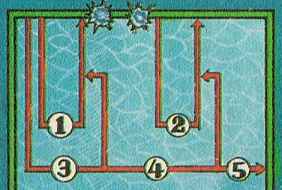
From マル勝PCエンジン6月号付録 in 1990.
       [Movie] - Download